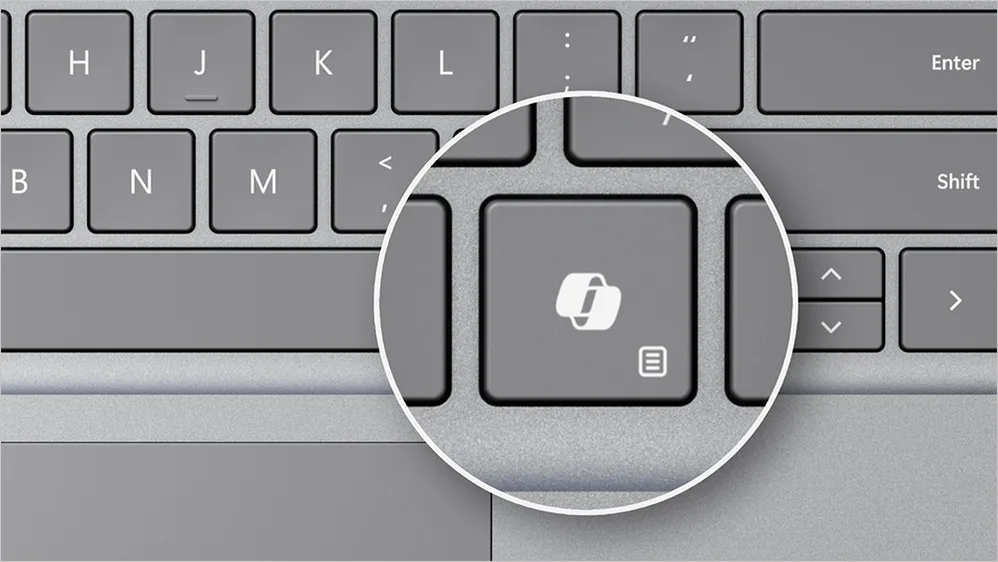

Microsoft has made its biggest change to the Windows keyboard layout in three decades. New Windows 11 PCs and laptops are now shipping with a dedicated Copilot key, a hardware shortcut that launches Microsoft’s AI assistant directly from the keyboard. It’s a small change on the surface, but it signals something significant about where Microsoft is taking the Windows experience for businesses.
Here’s what the Copilot key does, which devices have it, and what it means if you’re managing a fleet of business devices.
What Is the Copilot Key?
The Copilot key sits on the keyboard between the Alt and arrow keys on new Windows 11 devices. Press it and Microsoft Copilot opens immediately — ready to answer questions, summarise documents, draft content, or assist with whatever you’re working on at that moment.
Think of it as a direct shortcut to AI assistance, built into the hardware rather than buried in a menu. For businesses already using Microsoft 365 Copilot, it makes accessing that functionality faster and more intuitive. For those who haven’t yet explored Copilot, it lowers the barrier to entry considerably.
Which Devices Have the Copilot Key?
The Copilot key is included on new Windows 11 PCs and laptops from major manufacturers including Microsoft Surface, Dell, HP, Lenovo, and Samsung. It forms part of Microsoft’s Copilot+ PC specification — a new hardware standard that defines the minimum requirements for running AI-powered features locally on the device.
Copilot+ PCs require a dedicated Neural Processing Unit (NPU) capable of at least 40 trillion operations per second (TOPS). This on-device processing power enables AI features to run locally rather than entirely in the cloud, which has implications for both performance and data privacy.
If your business is planning a device refresh, it’s worth considering whether Copilot+ certified hardware is the right choice — particularly if you’re rolling out Microsoft 365 Copilot across your organisation.
What Can the Copilot Key Actually Do?
The functionality available through the Copilot key depends on your Microsoft 365 licencing and how your environment is configured, but broadly it provides access to:
- Natural language search across your device and Microsoft 365 data
- Document summarisation — get a quick overview of a lengthy report or email thread without reading the whole thing
- Content generation — draft emails, documents, and responses from a simple prompt
- Settings and system assistance — ask Windows to adjust settings or find files using plain English rather than navigating menus
- Image generation and editing on supported Copilot+ devices
For business users, the most practical day-to-day value comes from the Microsoft 365 integration — particularly in Outlook, Teams, and Word where Copilot can genuinely reduce time spent on routine tasks.
What Should IT Managers and Business Owners Consider?
Licencing
The Copilot key is a hardware feature available on any new Windows 11 device — but the full Microsoft 365 Copilot functionality it connects to requires a Microsoft 365 Copilot licence as an add-on to your existing Microsoft 365 subscription. The key without the licence still provides basic Windows AI features, but the business productivity benefits are significantly reduced.
Device Refresh Planning
If your business device estate is due for a refresh, it’s worth factoring Copilot+ PC specifications into your procurement decisions now. Buying hardware that supports AI features today means you won’t need another refresh cycle when AI tools become more central to how your team works.
Security and Data Governance
As with any AI tool in a business environment, it’s important to ensure your Microsoft 365 data governance and permissions are properly configured before employees start using Copilot extensively. AI that can surface information across your organisation’s data is only as secure as the permissions structure underpinning it.
Getting Your Business Ready for Copilot
Whether you’re planning a device refresh, exploring Microsoft 365 Copilot licencing, or simply want to understand what these changes mean for your business, getting the right advice before you invest makes a significant difference.
At Via Wire, we support businesses with Microsoft 365 licencing, device procurement, and Intune device management — ensuring your hardware and software work together effectively. Get in touch today to discuss your Microsoft device and licencing requirements.


0 Comments