
Our Blog
Tech Pulse

What is CSS? A Beginner’s Guide to Website Design and Styling
When web designers talk about CSS, many business owners feel lost. But it’s actually easier to understand than it sounds. CSS stands for Cascading Style Sheets, and it’s essentially the wardrobe for your website. While the underlying website (HTML) is the skeleton,...

Laptop Airflow: Why It Matters in Hot Weather
When summer temperatures soar, your laptop can struggle just as much as you do. Whether you’re working from home, on the go, or catching up on emails outside, poor laptop airflow in hot weather is a serious risk, one that can lead to overheating, system crashes, and...

How to Start Your Zero Trust Journey (Without Breaking the Bank)
Zero Trust sounds great, but isn't it only for big corporations with deep pockets? Not at all. Small and medium-sized businesses can adopt Zero Trust principles using tools they likely already have. Here's how to get started in a budget-friendly, manageable way....
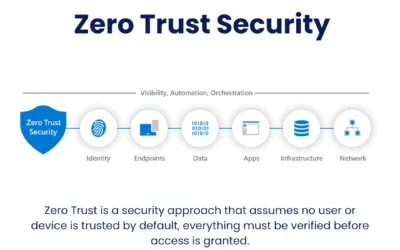
The 5 Core Principles of Zero Trust (And How They Work Together)
Zero Trust isn’t just a buzzword — it’s a mindset shift. At its heart are five principles that work together to keep your business safe. Whether you're running a small team in Essex or managing remote staff across the UK, these pillars apply to every business. ...

What Is Zero Trust? And Why Your Business Needs It
Introduction Imagine locking your front door but leaving the windows wide open. That’s what traditional cybersecurity often looks like. In a world where cyber threats are growing more sophisticated, businesses can no longer rely on old defences. Enter Zero Trust — a...

Why Shadow IT Could Be the Silent Risk in Your Business
In a world of increasing digital flexibility, the lines between company-approved tools and employee preferences are getting blurry. Welcome to the world of Shadow IT — where unauthorised apps and services sneak into daily operations, often with good intentions but...

5 Essential IT Best Practices Every Business Should Follow in 2025
As we head into 2025, the business landscape is more reliant on technology than ever before. From remote work to cloud services, digital transformation continues to reshape how companies operate. To stay competitive, it’s crucial for businesses to not only keep up...